
In 2002 I was coding isixsigma.com by hand in Classic ASP with a SQL Server database.
I did not know a tremendous amount about writing websites that scale.
Anybody can build a website that serves tens or hundreds of people. That version of the site worked fine on my machine. It worked fine in production, too, for a while.
Then traffic went from interesting to hundreds of thousands of people a month.
That is when the cracks showed.
The code was the usual suspect
The discussion forum leaked memory. A popular thread would sit there chewing RAM until the box fell over. I would patch it, reset IIS, and bring the site back. That was a normal Tuesday.
Database connections got opened and never quite closed. Under light traffic you never noticed. Under real traffic, SQL Server ran out of connections and the whole site started throwing errors that looked like the internet was broken.
Session state lived in memory on the web server. Fine for a few hundred visitors. It got ugly when thousands of people were logged in at once, each carrying a bag of session data the server refused to forget.
Some pages pulled entire recordsets with no pagination. It worked in testing. It did not work when a forum category had tens of thousands of posts and every visitor asked for all of them.
When any of that happened, the site went down. I hunted the code path, fixed it, reset the web server, and waited for it to come back. It was not unusual.
The outage that was not an outage
One day around 2002, the site went down again.
I did the usual checks. I talked to the host. Everything appeared to be operating just fine. The website was not technically down. There was no obvious coding issue. The error logs were not filled with anything useful.
So I emailed tech support and asked what was going on, and how it could be fixed.
After an hour or so, they replied by email: “Hey, it looks like your domain name has expired.”
The domain registrar I was using was supposed to be sending renewal emails for the domain name, but I never received them.
After expiration, the domain eventually enters a grace period and stops resolving as a cue to the owner to look into the domain name.
When that happens, the website stops resolving. Email stops resolving and gets bounced back to customers trying to contact you. Payments stop working if they rely on the domain name. Pretty much everything falls apart.
I believe I was using a registrar called RegisterFly at the time. They later went out of business, and the domain transferred to GoDaddy. Not surprising they went out of business given that their renewal emails were not reaching me.
So I just had to renew the domain name, wait an hour or so, and — voila — the website came back online.
The site was down for maybe six or eight hours that day. It felt like an eternity. Every minute felt like an hour.
All I could think about was the lost revenue caused by this simple, ridiculous event: my domain name expiring. It should never have happened.
The stack changed. The lesson did not.
A few years later we migrated to Joomla. A few years after that, we migrated to WordPress.
I still think about the fact that domains can expire. I regularly run across stories from people whose domains expired for one reason or another. Auto-renew failed on a dead credit card. The registrar email went to an old inbox or to the spam folder. The person who registered the name left the company. The agency that built the site no longer has the contract.
This is not a 2002 problem. Streaming companies have done it during a live event. National broadcasters have done it. Microsoft has done it more than once. If a company with a whole department can miss a renewal, a WordPress site owner checking email between client work can miss it too.
The site can be fine. WordPress can be running. The host can be green. And nobody can reach you.
A widget for the people who live in WordPress
I operate a 100% WordPress portfolio of websites nowadays. I decided to build a simple widget plugin you can install on your site. It watches the domain that site runs on, and it notifies you about domain-related issues that need your attention.
It is called Notify.domains Domain Monitor. It is free in the WordPress plugin directory.
You do not need a Notify.domains domain monitor account to use it.
Install it, activate it, and a box appears on Dashboard Home.
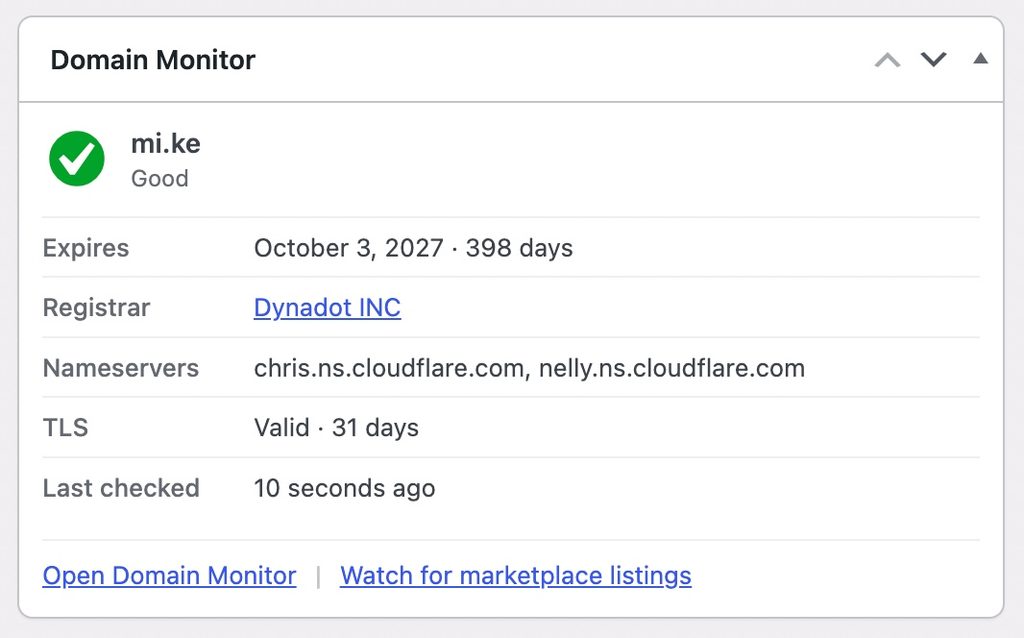
You see how many days until the domain is due to renew, the company you bought it from, where the domain is pointed, and whether the https certificate is still valid. It uses the site address already in Settings → General. That is the only name it watches: this site.
Get it from the WordPress.org listing. Or search for Notify.domains Domain Monitor under Plugins → Add Plugin.
How it notifies you
Three places, on purpose. All of them are inside WordPress, where you already work.
- The dashboard widget on Dashboard Home. Days until expiry, registrar, nameservers, https. You see it when you log in.
- A notice at the top of Posts, Pages, and the rest of wp-admin when something is critical: expiry inside 7 days, the domain on hold or pending delete, or an expired certificate.
- Email to the WordPress admin address in Settings → General. That mail fires when expiry crosses 30, 14, or 7 days, when the registry puts the name on hold or pending delete, when nameservers change, when MX records change, or when the https certificate is about to lapse.
Registrar reminder mail often goes to a former employee, a privacy proxy, or an inbox nobody checks. This goes to the address WordPress already uses.
That is the whole point. The people who log into WordPress are the ones who get blamed when the site goes dark. They should see the warning in the tools they already open.
The names that are not this site
You do not need a Notify.domains account to use the plugin.
If you want to watch a domain that is not the one this WordPress site runs on, that is a different problem.
A name that might be an upgrade for the business. Your last name. Your first and last name. Even your child’s first and last name.
Those names do not live in Settings → General. The plugin is not the right tool for them. It cannot check the domain while WordPress is down, and it is built for this site, not a portfolio of names you wish you owned.
That is what Notify.domains is for. Keep an eye on names you do not host. The watch keeps running even when this WordPress install cannot.
I still remember those six or eight hours. I would like fewer people to have their own version of that day.